Portfolio of shipped systems

Revenue systems, built for how your team actually runs.

Seven products designed, built and shipped for sales, finance, legal, customer success and nonprofit development teams. Each one replaced exports and spreadsheets with a single governed source of data.

01Pipeline

GTM Command Center

Four views on one login: an executive command center, a sales dashboard, a campaign funnel and a ranked call list. All four read the same Salesforce data, refresh every two hours and sit behind SSO.

Teams argue about revenue numbers because each person pulls them from a different report at a different time. One source and one refresh schedule remove the cause of the disagreement.
  • A forecast leaders can defend. Coverage, won to date and gap to goal in plain English. Every tile opens the deals behind it.
  • A pipeline reps actually work. Each deal closing this quarter gets a risk score, with a drafted follow-up for the owner.
  • Attribution marketing can trust. Every MQL traced to its outcome. Campaigns only get credit for opportunities created after they ran.
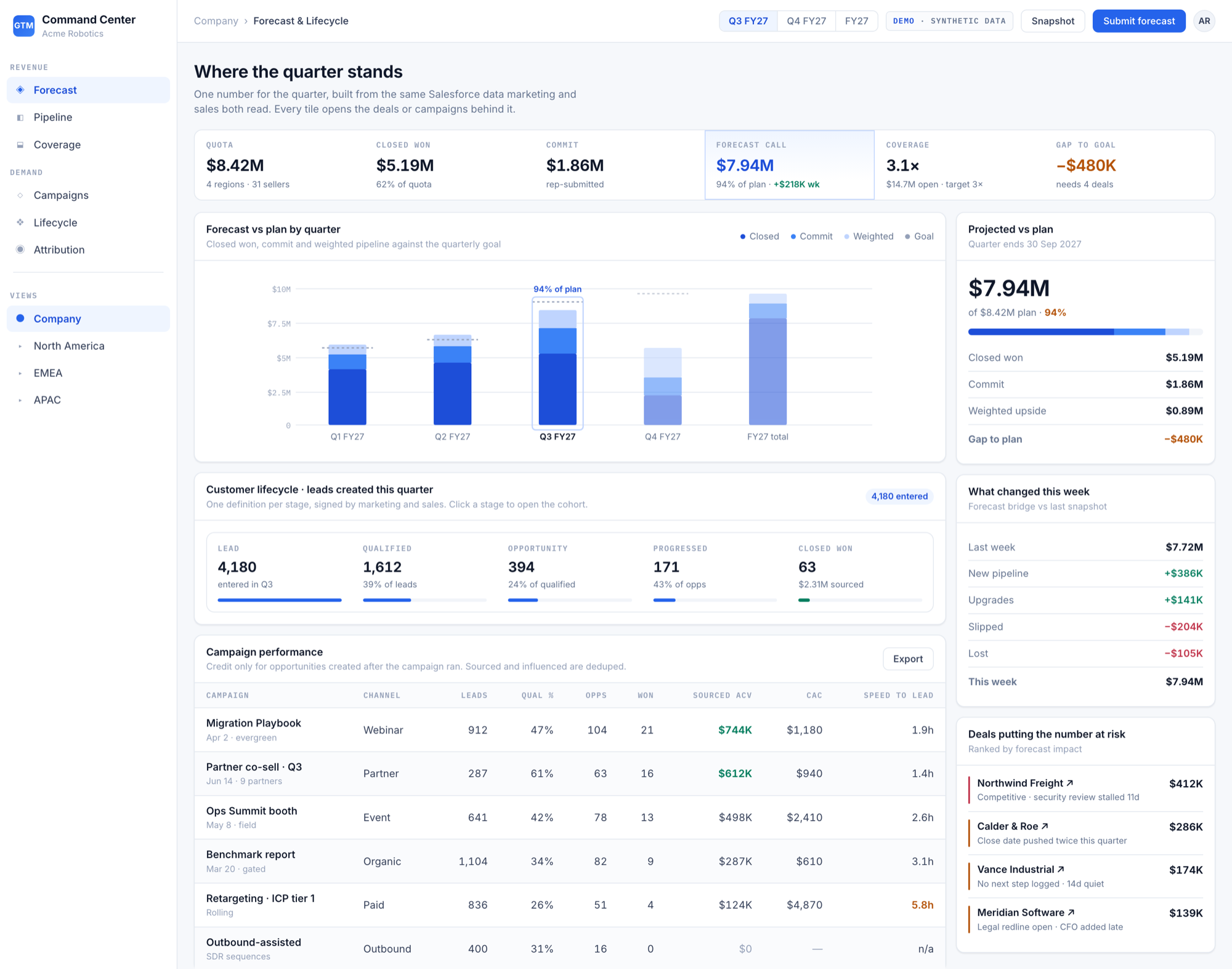
GTM Command Center forecast view showing quota, closed won, commit and forecast call tiles, a stacked forecast-versus-plan chart by quarter, a customer lifecycle funnel from lead to closed won, and a campaign performance table with sourced ACV and speed to lead.
02Forecast

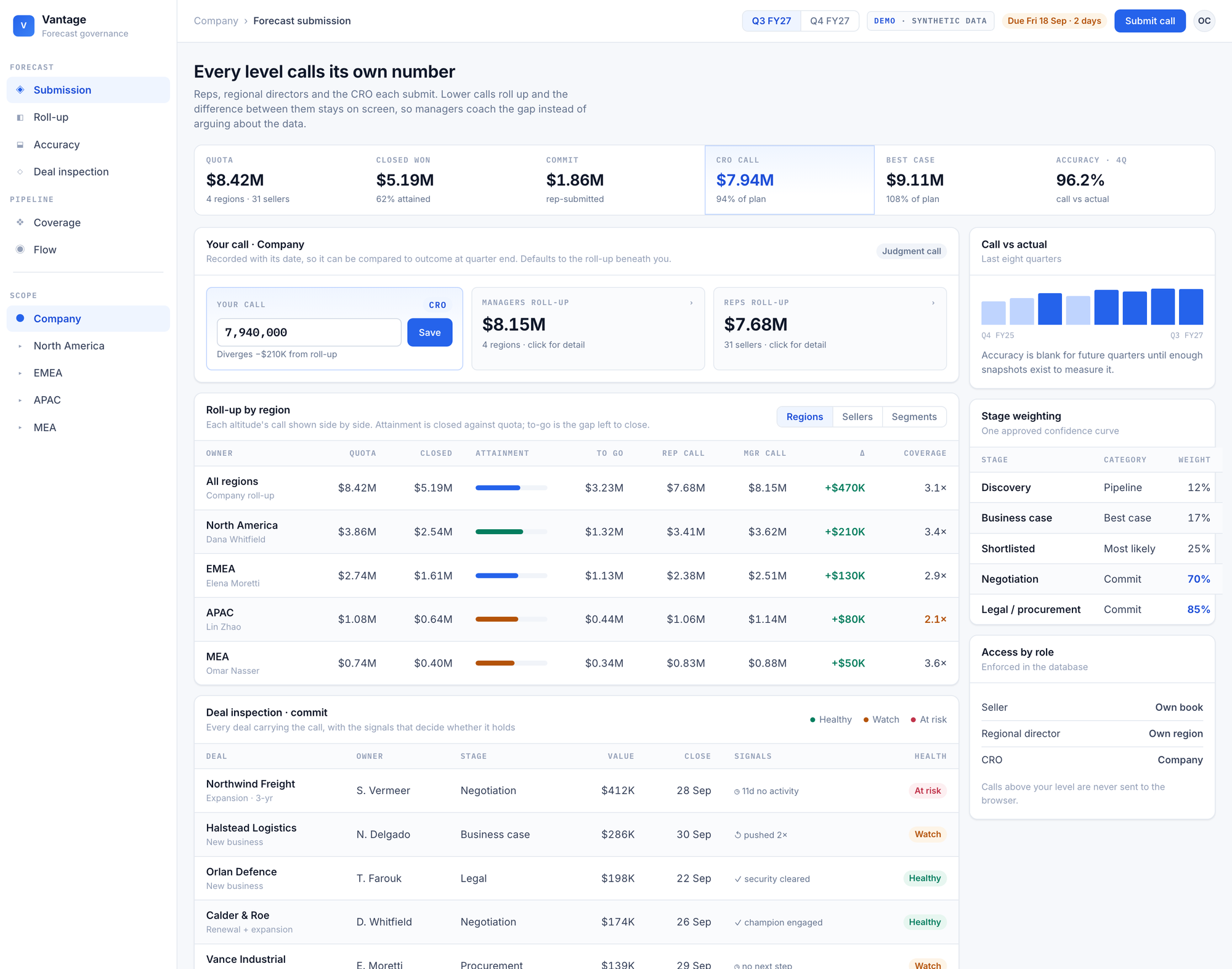
Vantage

A forecasting layer on top of Salesforce with four views: forecasting, pipeline coverage, a GTM funnel and pipeline flow. Users sign in with SSO and only see data for their role.

A forecast has two parts: facts about deals and judgment about which deals will close. When everyone shares the same facts and each level's judgment stays visible, managers can coach the gap instead of debating the data.
  • Calls roll up. Reps, regional VPs and the CRO each enter a call. Lower calls roll up, and any difference stays on screen.
  • One method. Each deal stage maps to a forecast category and weight on an approved confidence curve.
  • Access by role. Reps see their book, VPs their region, the CRO the company, all enforced by row-level security.
Vantage forecast submission screen showing the CRO call entered alongside the manager and rep roll-ups, a roll-up table by region with attainment bars and the difference between each level, and a deal inspection list with health signals.
03Contract

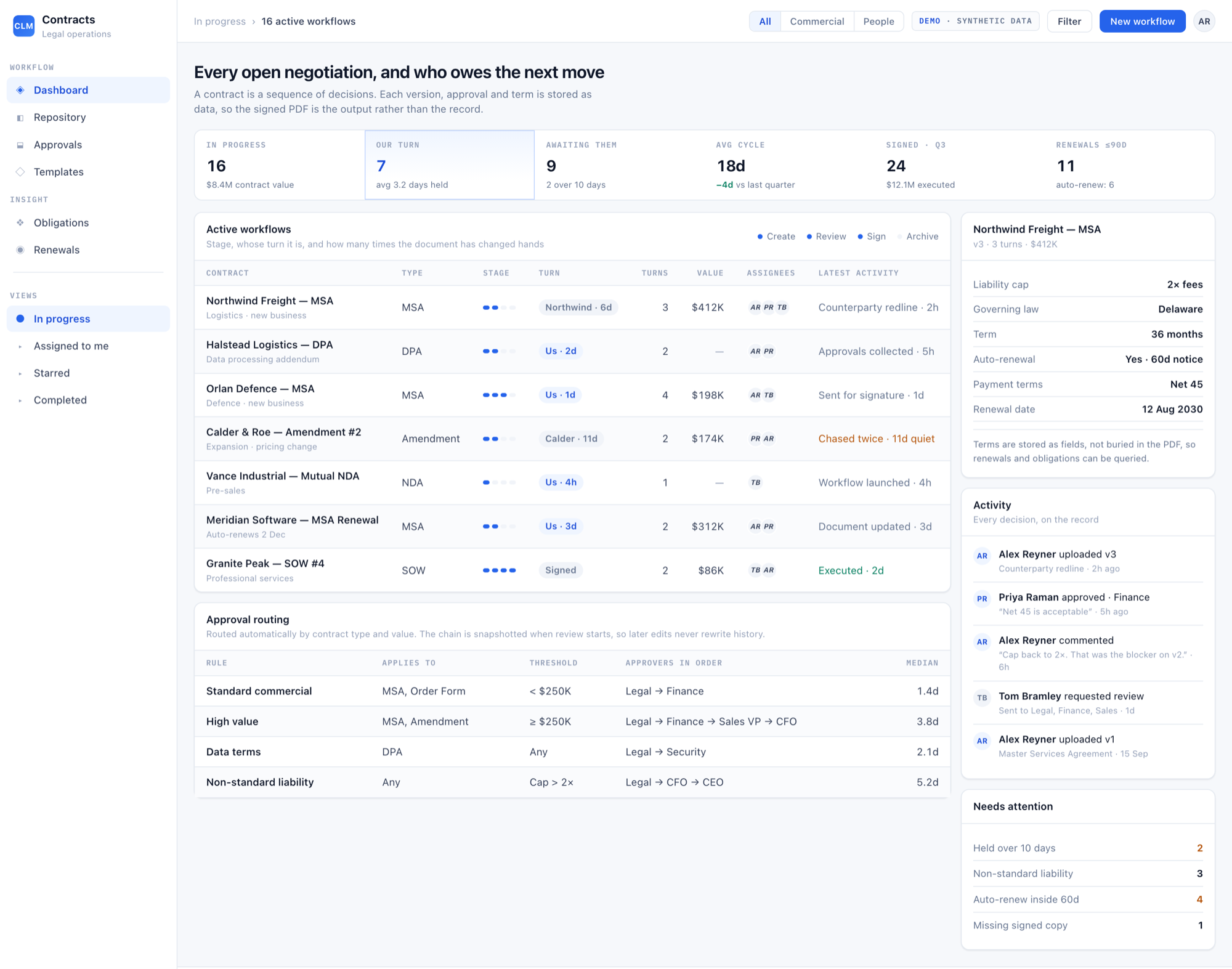
Contracts

Contract workflows from request through redline, approval and signature. Versions, approvals and key terms live on the record instead of in email threads.

A contract is the result of a series of decisions. If the tool stores those decisions as data, meaning each version, approval and term, then the signed PDF is simply the final output and the history is never lost.
  • Negotiate. Each upload becomes a numbered version on the same record, with comments and a clear owner for the next move.
  • Approve. Legal, Finance and Sales approvals route automatically by contract type and value.
  • Archive. Signed contracts keep their full history. Liability cap, governing law and renewal dates are stored as fields.
Contracts dashboard listing active workflows with stage progress, whose turn it is, number of turns, contract value, assignees and latest activity, above an approval routing table.
04Pay

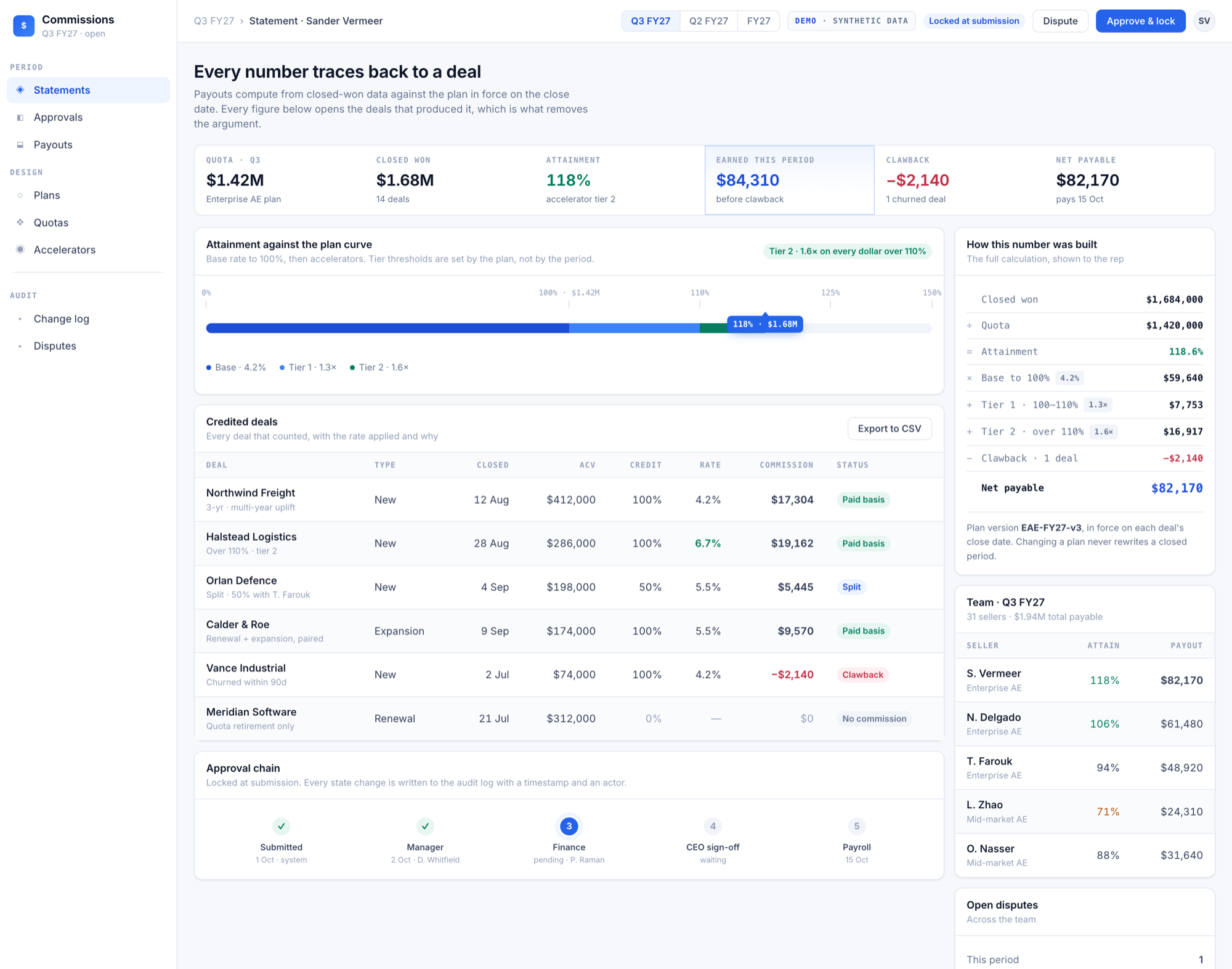
Commissions

Payouts calculated from CRM data, locked at submission and approved with a full audit trail, replacing the quarterly spreadsheet.

Most payout disputes come from reps not seeing how their number was calculated. When every rep can see the formula and each deal that counted, the dispute has no basis.
  • Calculated. Payouts computed from closed-won data against each plan's rules, accelerators and caps.
  • Controlled. Locked at submission and approved by the manager, Finance and the CEO, with full history.
  • Transparent. Every rep sees the formula and the deals behind their number.
Commissions statement showing attainment against the plan curve with accelerator tiers, a credited deals table with the rate applied to each, a step-by-step calculation trace from closed won to net payable, and the approval chain.
05Onboard

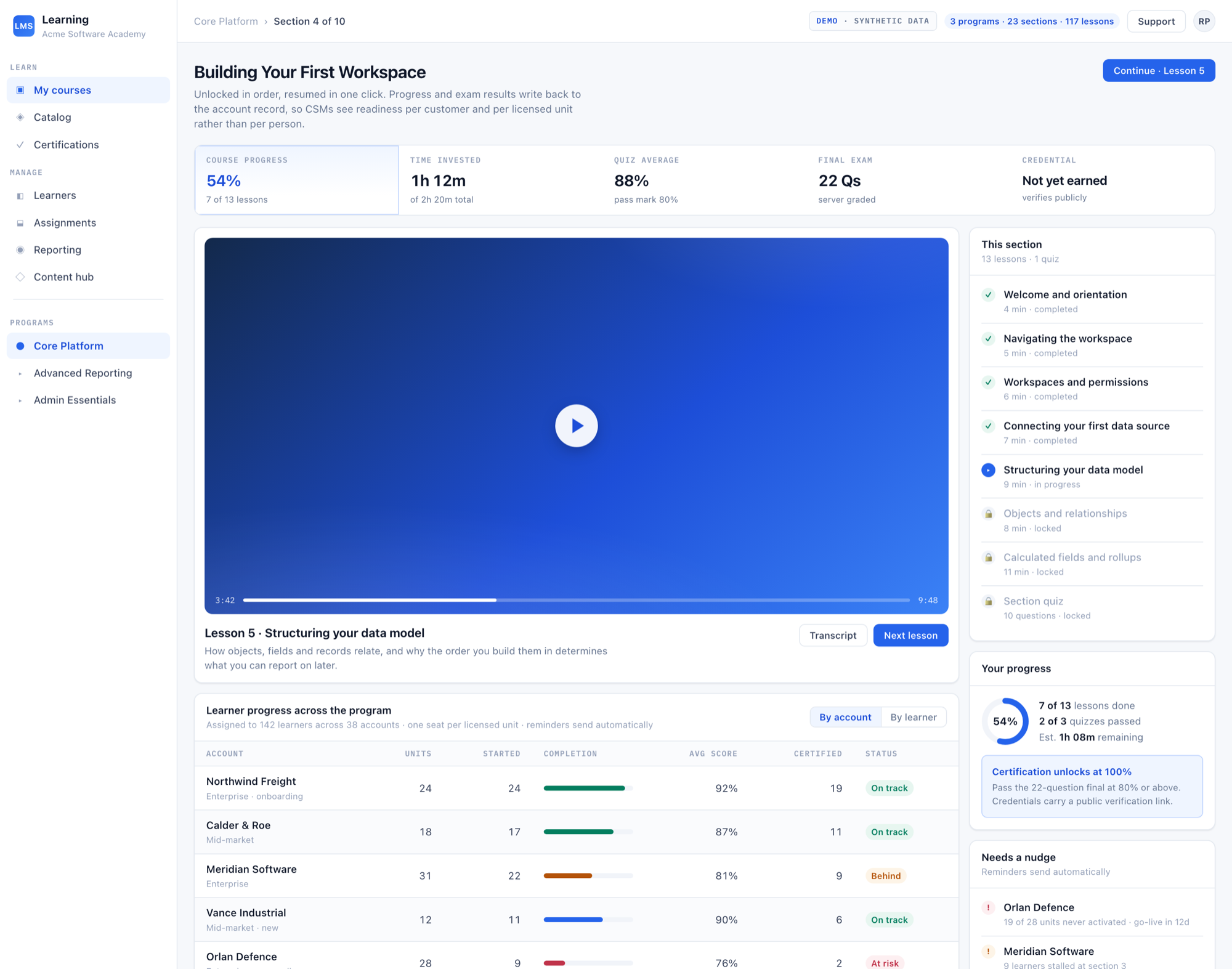
Learning Management System

Self-serve customer training: three programs, 23 sections and 117 lessons, unlocked in order, with server-graded exams and publicly verifiable credentials.

Most onboarding time is the same walkthrough repeated for each new customer. Work that repeats without change should be recorded once, put in order and tested. CSM time then goes to questions that need judgment.
  • Learn. Programs unlocked in order and resumed in one click, with progress tracked per learner.
  • Prove. Quizzes and final exams graded on the server at an 80% pass mark. Credentials verify publicly.
  • Operate. Admins load a roster at once, assign training with reminders and give CSMs a per-account progress view.
Learning Management System showing a lesson player at 54 percent course progress, a lesson checklist with completed, current and locked items, and a table of learner progress by account with completion bars, average scores and certification counts.
06Retain

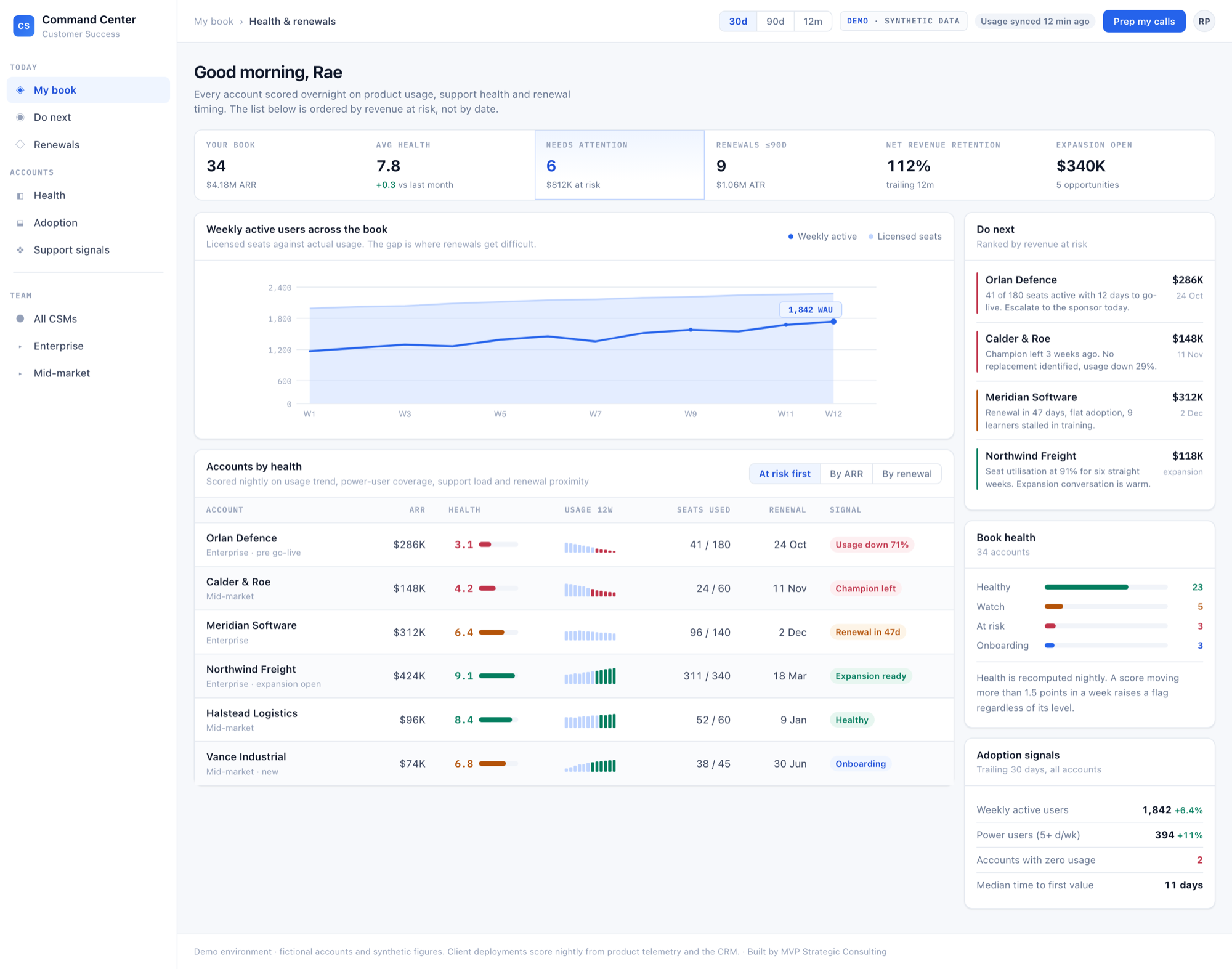
Customer Success Command Center

Every account scored nightly on usage, support health and renewal timing, with the day's work ranked by revenue at risk on one board.

Churn usually shows up in the data weeks before it shows up in a meeting. Checking the signals every day and ranking them by revenue at risk turns a surprise into a task.
  • Understand. One panel per account with usage trends, named power users, support health and an AI briefing.
  • Prioritise. A ranked 'do next' list covering accounts needing attention, renewals inside 90 days and implementations pre go-live.
  • Prepare. Call prep drafted from cached usage and support history, so it arrives in seconds.
Customer Success Command Center showing a twelve-week chart of weekly active users against licensed seats, a table of accounts scored by health with usage sparklines and renewal dates, and a do-next list ranked by revenue at risk.
07Nonprofit

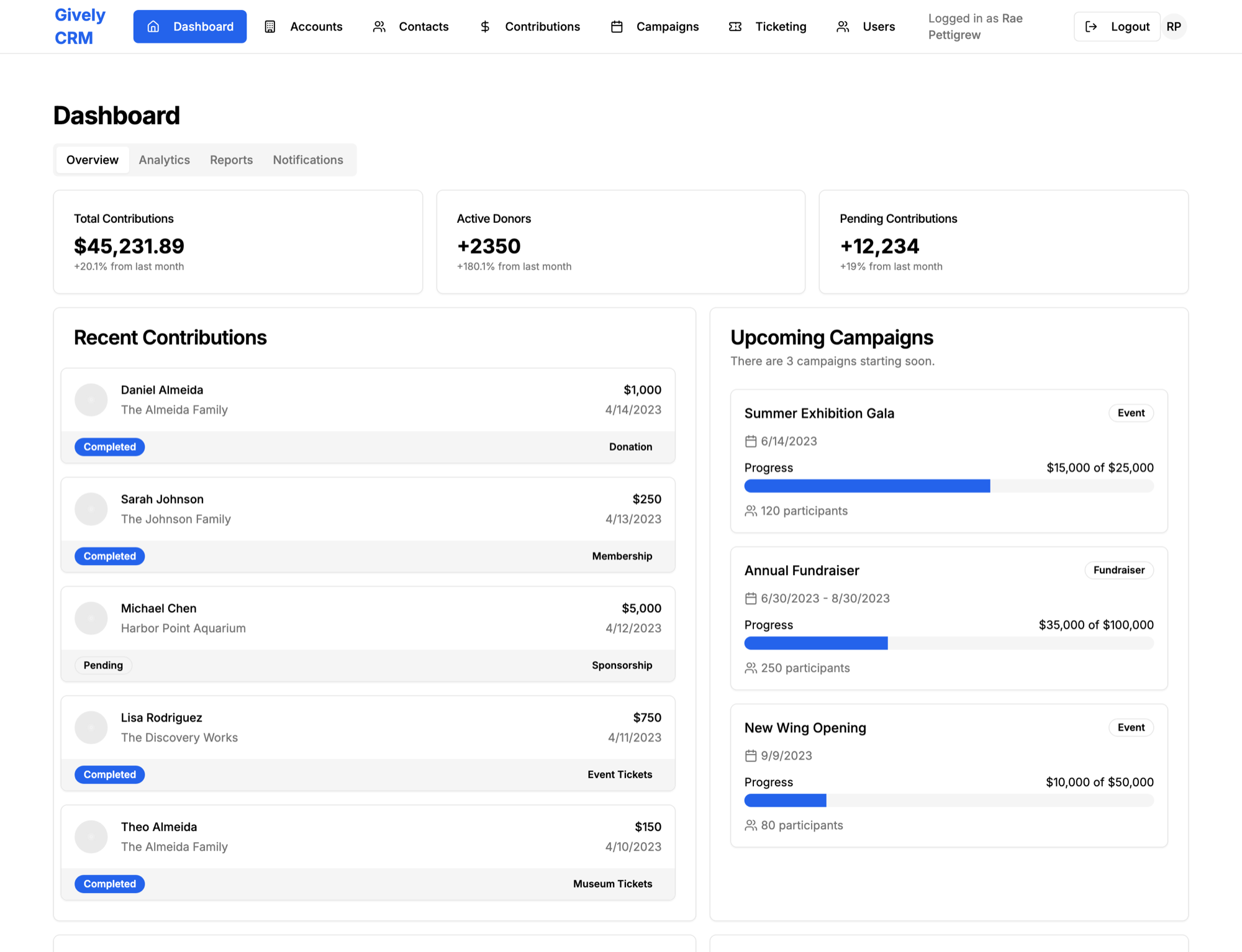
Gively CRM

A CRM for arts and culture nonprofits that keeps donor giving and ticket sales on one constituent record. Built for organisations that would otherwise run a box office system for seats and a separate donor database for gifts, then reconcile the two by hand.

The same person is in both systems, and neither one can see that. The household that buys four tickets a season is the strongest candidate for a first gift, but that fact only exists where ticket history and giving history meet. Put them on one record and the prospect list writes itself.
  • One account, both halves. Donations, memberships, sponsorships, pledges, event tickets and museum admissions all post against the same account, so a contribution list reads as one history rather than two exports.
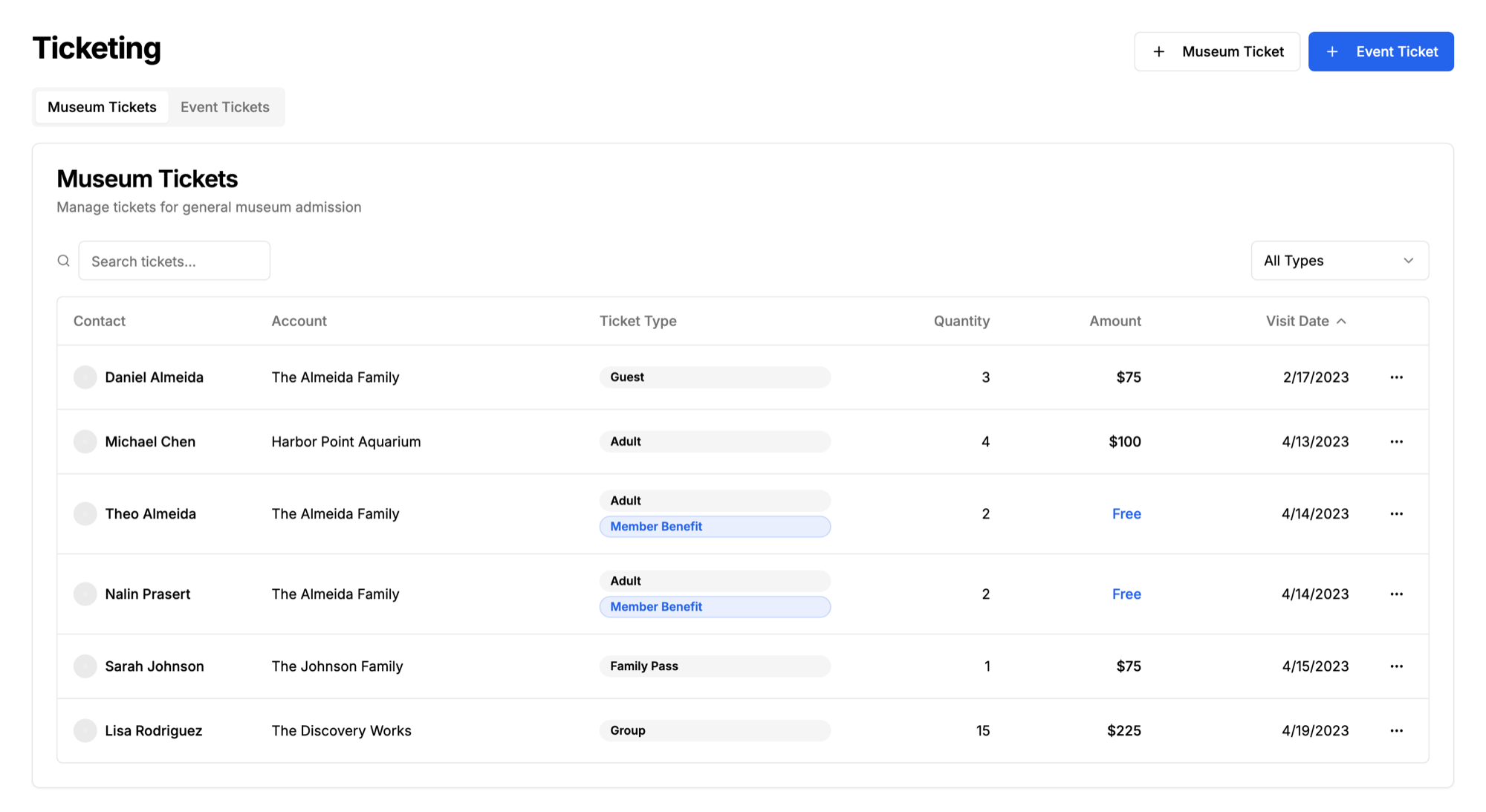
  • Membership that pays out. Member benefits price admissions automatically, so a member's tickets show as free against their account and the value of the membership is visible rather than assumed.
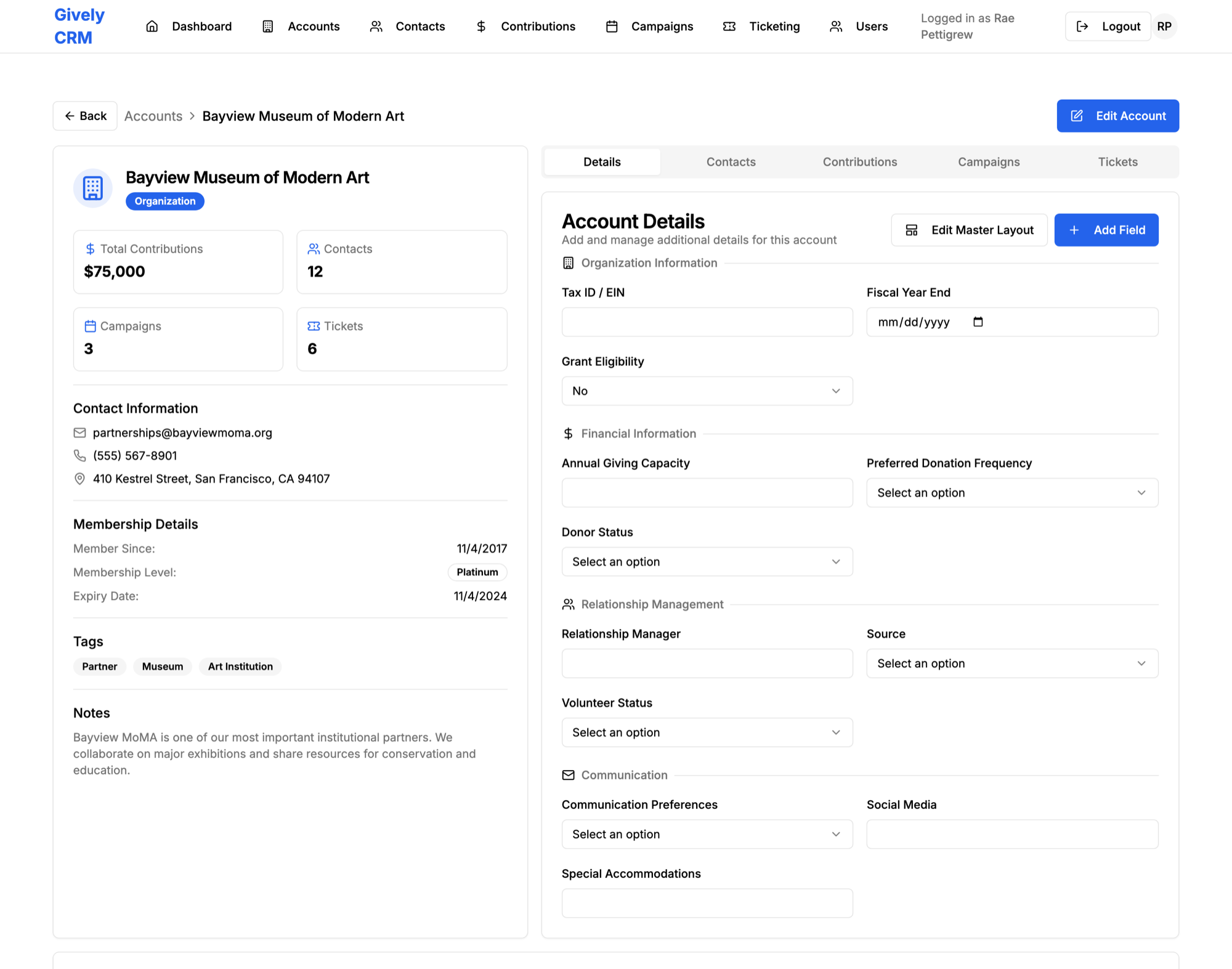
  • Shaped per organisation. Fundraising fields like giving capacity, donor status and relationship manager are added through a layout editor, so each organisation configures its own record without a code change.
Gively CRM dashboard showing total contributions, active donors and pending contributions, a recent contributions feed mixing donations, memberships, sponsorships, event tickets and museum admissions, and upcoming campaigns with progress against goal.
Gively CRM ticketing screen listing museum tickets by contact and account with ticket type, quantity, amount and visit date, where member benefit tickets are priced as free.Gively CRM account record for a museum partner showing total contributions, contact, campaign and ticket counts, membership level and expiry, and a configurable details panel with fundraising fields.

Every one of these started as someone's spreadsheet.

Tell us which number your team keeps rebuilding by hand, and we'll show you what replacing it looks like.

Request a demo

All screens show synthetic data and fictional companies. Client deployments run on the customer's own Salesforce or HubSpot, reconciled to source.